
Defining Preferences
In this chapter, we’re going to learn how to define preferences. When you developing your own extensions, you may want to allow users to make preferred settings.
To define your own preferences, create a preference JSON file in preferences/ folder of your extension. To read and write preference values, use app.preferences.
my-extension/└─ preferences/ └─ preference.jsonDefining preference schema
Section titled “Defining preference schema”Before we get in detail, it’s better to take a look at an example. Following is a part of preference schema of Java extension.
{ "id": "java", "name": "Java", "schema": { "java.gen": { "text": "Java Code Generation", "type": "section" }, "java.gen.useTab": { "text": "Use Tab", "description": "Use Tab for indentation instead of spaces.", "type": "check", "default": false }, "java.gen.indentSpaces": { "text": "Indent Spaces", "description": "Number of spaces for indentation.", "type": "number", "default": 4 }, ... }}This preference schema will be shown in Preferences Dialog (StarUML > Preferences… in MacOS, File > Preferences… in Windows and Linux) as the below image.
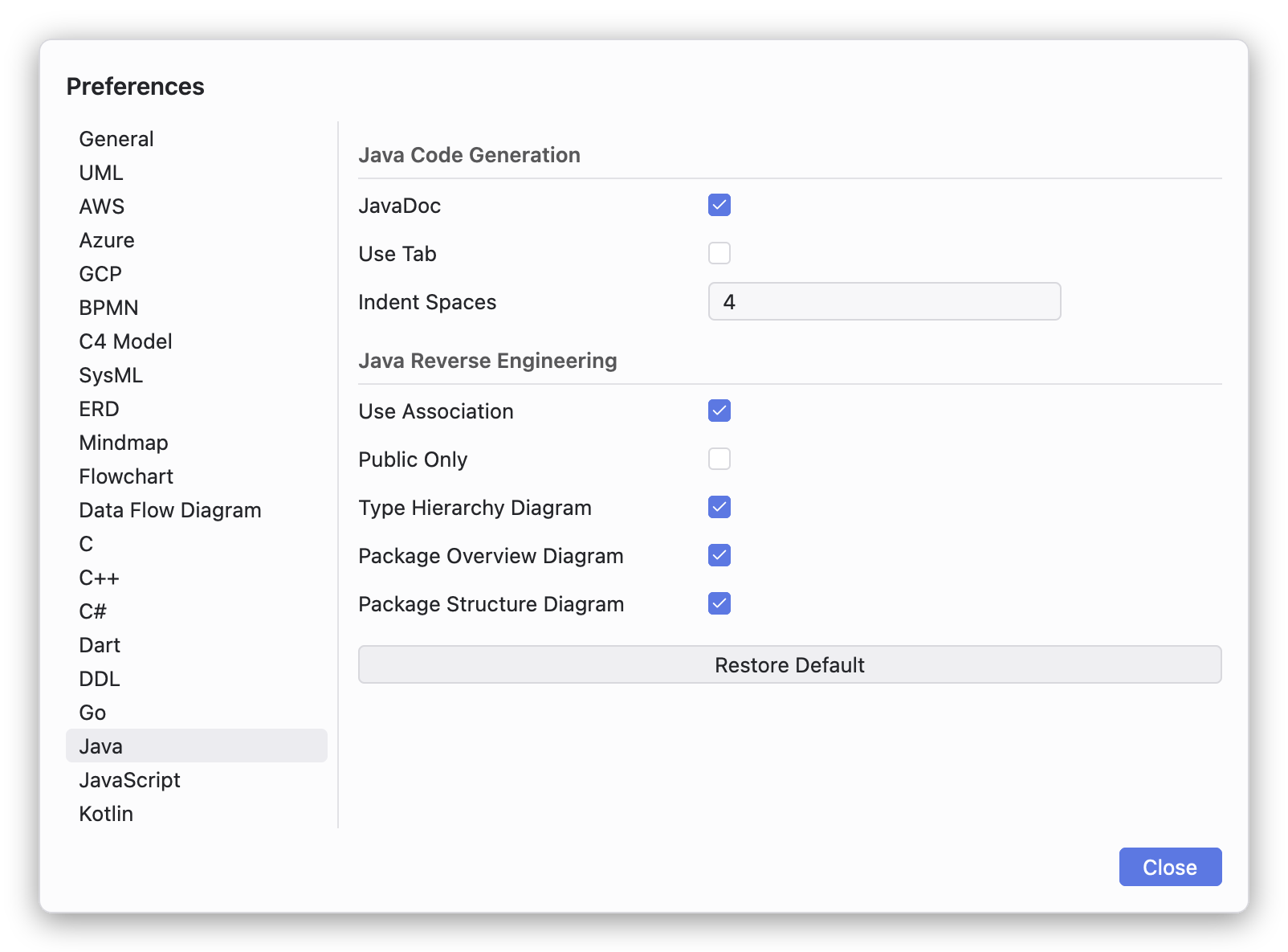
As shown in the above example, a preference schema have a unique ID, name, and a set of preference items. The preference schemas in preferences/ folder are registered when the extension is loaded.
A preference item should have the following properties.
- key : Unique identifier of preference item. It should be unique in all of the preference schemas, so it’s strongly recommend to include all the IDs of preference schema and section (e.g.
java.gen.useTab,java.gen.indentSpaces). - text : Name of preference item. It will be shown in Preferences Dialog instead of
key. - description : Short description of preference item.
- type : Type of preference item. Available types will be described later.
- default : Default value of preference item.
- options (optional) : Options users can select one of. This property is mandatory for
ComboorDropdownpreference items. This property should be defined as an array of objects having two fields:valueandtext. (e.g.[ { "value": 0, "text": "female" }, { "value": 1, "text": "male" } ])
Available types of preference item are as follow.
- section : Just for grouping preference items, so it has no actual preference value.
- string : Allows users can edit a text (a string value).
- check : Allows users can check or uncheck (a boolean value).
- number : Allows users can edit a number value.
- combo : Allows users can select a value from the defined options. (In StarUML 8, it is the same as dropdown. Users cannot edit a value which is not in the options.)
- dropdown : Allows users can select from the defined options.
- color : Allows users can select a color value. This type of preference item allow to set
defaultproperty value tonull. It means nothing selected. Additionally, allow to definedefault-buttonproperty like as"default-button": { "text": "Use Default Color" }. When it defined, a Use Default button is shown next to color widget in Preferences Dialog and changes to the default value when it pressed.
Reading preference values
Section titled “Reading preference values”You can read value of a particular preference item by calling get function with key of the preference item. It returns user selected value or default value. If passed undefined key, it returns null value (or the second argument if passed).
app.preferences.get("java.gen.useTab") // falseapp.preferences.get("java.gen.indentSpaces") // 4app.preferences.get("java.gen.undefined-item") // nullapp.preferences.get("java.gen.undefined-item", 0) // 0Writing preference values
Section titled “Writing preference values”You can also write value for a particular preference item by calling set function with key and value. Note that you have to pass value of correct type conform to the type of preference item. For example, do not pass string value to a preference item of check type.
app.preferences.set("java.gen.useTab", true)app.preferences.set("java.gen.indentSpaces", 2)app.preferences.get("java.gen.useTab") // trueapp.preferences.get("java.gen.indentSpaces") // 2Listening preference changes
Section titled “Listening preference changes”To do something when a preference value is changed, listen change event of app.preferences.
app.preferences.on('change', function (key, value) { if (key === 'java.gen.useTab') { console.log('Use Tab:', value) }})