
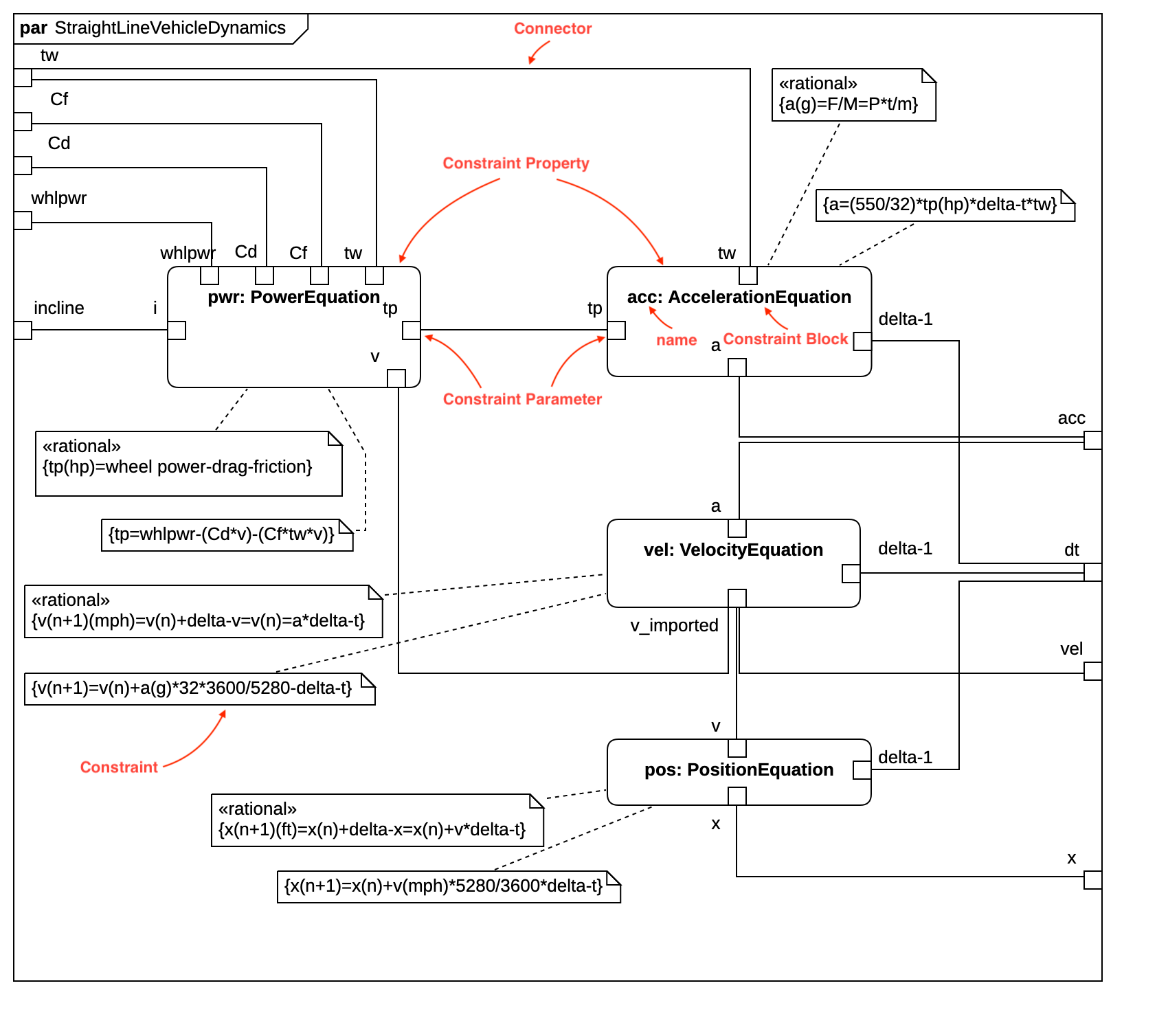
Parametric Diagram
Create Block Definition Diagram
Section titled “Create Block Definition Diagram”To create a Parametric Diagram:
- Select first a Constraint Block where a new Parametric Diagram to be contained as a child.
- Select Model | Add Diagram | Parametric Diagram in Menu Bar or select Add Diagram | Parametric Diagram in Context Menu.
Constraint Property
Section titled “Constraint Property”To create a Constraint Property:
- Select Constraint Property in Toolbox.
- Drag on the diagram as the size you want.
To create a Constraint Property (model element only) by Menu:
- Select a Constraint Block where a new Constraint Property to be contained.
- Select Model | Add | Constraint Property in Menu Bar or Add | Constraint Property in Context Menu.
You can use QuickEdit for Constraint Property by double-click or press Enter on a selected Constraint Property.
-
Name Expression : Edit name expression.
Syntax of Name Expression
expression ::= [ '<<' stereotype `>>` ] [ visibility ] namestereotype ::= (identifier)visibility ::= '+' | '#' | '-' | '~'name ::= (identifier) -
Visibility : Change visibility property.
-
Add Note : Add a linked note.
-
Add Constraint : Add a constraint.
-
Select Constraint Block : Select a Constraint Block and assign it to type property.
-
Create Constraint Block : Create a Constraint Block and assign it to type property.
-
Add Constraint Parameter : Add a constraint parameter.
Constraint Parameter
Section titled “Constraint Parameter”To create a Constraint Parameter:
- Select Constraint Parameter in Toolbox.
- Click on the element (e.g. Constraint Property or Parametric Diagram Frame) where Constraint Parameter to be contained.
You can use QuickEdit for Constraint Parameter by double-click or press Enter on a selected Constraint Parameter.
-
Name Expression : Edit name expression.
Syntax of Name Expression
expression ::= [ '<<' stereotype `>>` ] [ visibility ] namestereotype ::= (identifier)visibility ::= '+' | '#' | '-' | '~'name ::= (identifier) -
Visibility : Change visibility property.
-
Add Note : Add a linked note.
-
Add Constraint : Add a constraint.
-
Select Block : Select a Block and assign it to type property.
-
Create Block : Create a Block and assign it to type property.